
TeamsCompete Schedule Management Service continues to support our client leagues after the schedule has been published.
- We Manage the Game Change Process
- Distribute Weekly Game emails to Programs and Facilities
- Provide Programs with Unplayed/UnScored Game Reports
- Communicate updates to official assignors
- and more.
OUR GAME CHANGE PROCESS
One thing is for certain once the league schedule is published; There Will be Changes. Game changes fall into two types, those that are disruptive to the entire league and those that are more localized, impacting just a few teams.
Disruptive League Wide Changes: Some change request have broad impact on the league, impacting a large number of games.
- A single dropped team can create over 40 game changes in the schedule.
- When fields haven’t dried out yet early in the spring season, postponement come in droves
- In a league with 200 teams, a weekend washout disrupts the 100 scheduled games and can cause 150+ game change requests.
Limited Impact Changes: Each season there are also game changes that were unforeseen at the start of the scheduling process. These changes tend to impact one team or the other and limits attendance number forcing a time or date change. Examples include,
- That school dance that wasn’t on anyone’s radar until parents saw the published schedule.
- The dance recital that the coach was unaware would affected half his players.
TeamsCompete manages game change requests for our client leagues through the last whistle of the season.
- We build a form where change requests can be submitted to the league.
- We insure the requests are visible to the league so programs can track the status of their submitted requests.
- We notify the person making the request when it is completed or if we need additional information.
- We coordinate with the official assignors to insure they are aware of the new time and date.
SCHEDULE NOTIFICATIONS
TeamsCompete provides league programs with a number of communications during the season. Some of these communications are weekly while some are targeted
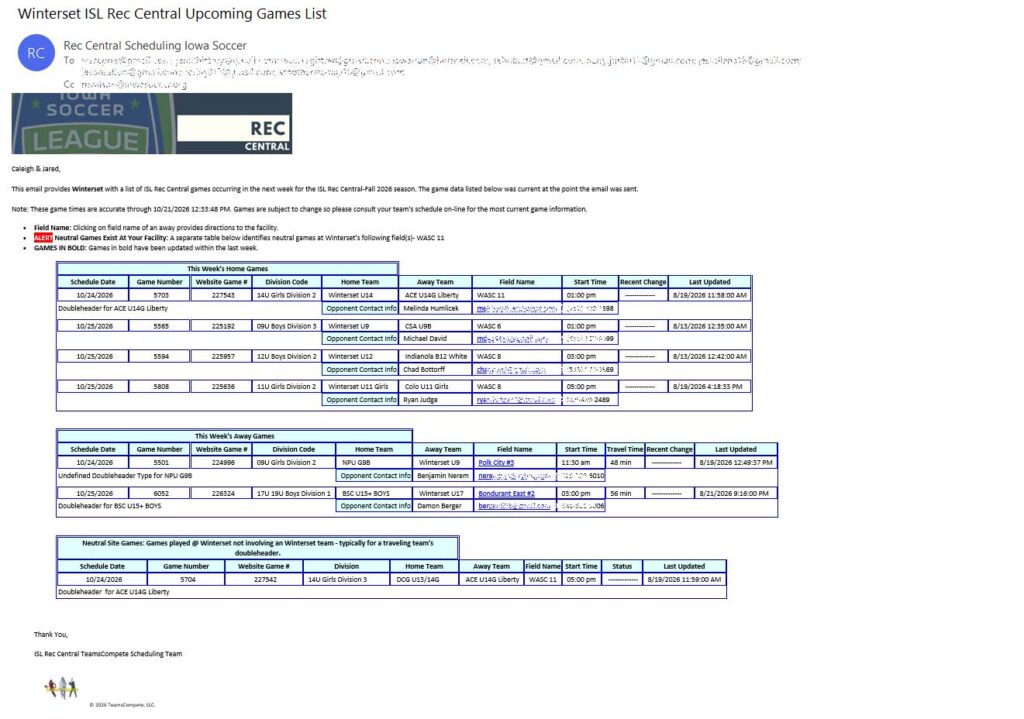
Member Program Weekly Upcoming Game Email: Each week during the season, we email every league program a list of their upcoming games for the next seven days. These emails contain-
- Each email is branded with the League’s logo.
- The email has four sections of games: Home, Away, Neutral Games (being played at the programs facility), and Cancelled/Postponed/Need Attention.
- Each Game lists an opposing team point of contact with email address provided at a minimum.
- Highlights teams that are playing more than one game (doubleheaders, three team round-robins, etc)
- Map links to Away Game facilities.
- When client leagues utilize TeamsCompete’s integrated Officiating Module.
- Assigned officials are listed for each game.
- The payment rate due an official is clearly listed along with the crew’s contact information.
 |
Facility Weekly Upcoming Game Email: This email contains the list of games and team contacts playing at a specific facility over the next 7 days. This email provides facility directors with confirmation of scheduled games, denotes any changes, and includes contact information for each coach.
Cross League Home Facility Game Email: This email consolidates home games for a member program across multiple seasons or leagues scheduled by TeamsCompete, providing program leadership with a single view of their home facilities for a weekend.
Unplayed/Unscored Game Email: No matter how well a league communicates it policies, there are always those teams that don’t postpone games properly or who don’t report scores in a timely manner. Identifying those games in the schedule and notifying programs and coaches of their responsibilities is one of the challenges we see facing leagues. TeamsCompete’s Unplayed/Unscored game email solves this problem by notifying member programs of a list of games that they need to reschedule or report scores. This helps reduce the end of season scramble to play games with standings implications.
OFFICIATING MODULE
The TeamsCompete Officiating Module fully integrates with the TeamsCompete scheduling service and supports a complete assigning process. The Officiating Module is also available to clients who wish to mirror assignments made in other systems. This enables clients to leverage notifying programs of official assignments in the Weekly Game Email and provide post game reporting.
Assigning Officials: The assignment process allows direct assigning of officials to individual games. In addition to flagging overlapping assignments, the officiating module also detects drive time issues with an assignment.
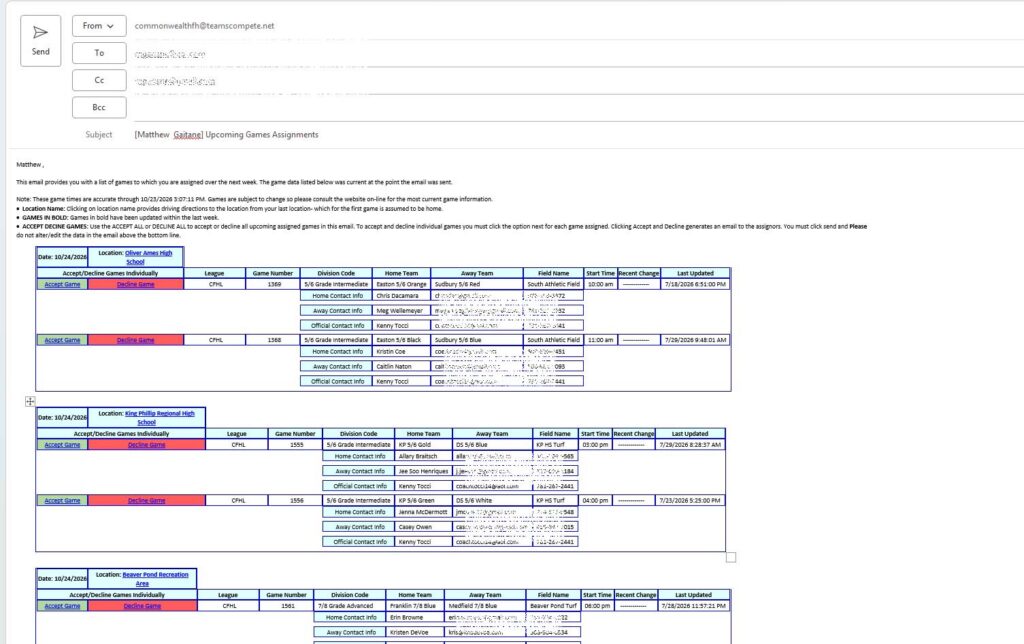
Assignment Emails: Officials receive emails with their upcoming assignments. Data provided in the email includes
- All games assigned in TeamsCompete scheduled games for the next seven days.
- The email includes primary contacts for each team in assigned games.
- Contact information for any other official in the crew.
- Complete Driving Directions from the official home to the last field facility assigned
- Ability to Accept or Decline All or individual game assignments.
 |